Tuesday, June 16, 2015

Ericsson: Around 30 percent smartphone penetration in the Philippines

Ericsson: Around 30 percent smartphone penetration in the Philippines


The smartphone penetration in the Philippines at the end of 2014 was around 30 percent and is expected to be at around 40 percent at the end of 2015.


Almost two-thirds of mobile phone subscriptions in South East Asia and Oceania will be using smartphones by 2020 


By 2020, mobile traffic in the region will multiply nine times reaching three Exabytes /month

Applications for social networking, instant messaging and video streaming dominate smartphone usage - Facebook and YouTube are consistently in the top five mobile apps in the countries analyzed, including the Philippines.

Ericsson (NASDAQ: ERIC) releases its third South East Asia and Oceania Region Appendix to the Ericsson Mobility Report. The appendix illustrates regional contrasts in areas such as smartphone uptake, top app usage, access to LTE, and network performance. 

Mature markets such as Australia and Singapore, where LTE is widely available, have a very high mobile broadband penetration, already exceeding 90 percent. Developing markets on the other hand, still have a long way to go, which offers a unique opportunity for mobile operators to enhance the mobile broadband experience for users.

The smartphone penetration in the Philippines is estimated at around 30 percent and is expected to be at around 40 percent by the end of 2015. This provides an exceptional growth opportunity for service providers and device manufacturers in South East Asia as users consume more data through newer and faster devices.

Afrizal Abdul Rahim, Ericsson Head of ConsumerLab for Region South East Asia and Oceania, says: “The increasing availability of affordable smartphones, internet access andmobility is enabling more consumers to access the benefits of the Networked Society. In fact, in the Philippines smartphones are the primary way of getting online”. 
 

“Today in South East Asia and Oceania, 25 percent of handsets are smartphones. We predict that by 2020, smartphone subscriptions will grow three times to almost 800 million in the region, while LTE and 3G subscriptions will constitute almost 25 and 70 percent, respectively, of regional mobile subscriptions by 2020,” Afrizal said.

Uptake in smartphone subscriptions and growing interest in video and other app services will drive a nine-fold increase in mobile traffic volumes to three Exabytes /month by 2020. 


In the South East Asia and Oceania region, social networking, instant messaging and video streaming are among the top five app categories actively used by smartphone users in the region. In the Philippines, Facebook, Facebook Messenger, Viber, YouTube and Instagram are the top five apps actively used by smartphone users.

For service providers, delivering a consistent user experience aligned with the most popular apps can help drive customer satisfaction. In order to do this, operators need to optimize and tune their networks to ensure users’ particular app coverage demands are catered for in different traffic situations and geographical areas.

Countries in the region with the best network performance are Australia and Singapore, due to their leadership in deploying LTE and LTE Advanced. This has meant that the gap in network performance with other countries across the region has widened. “However, we expect developing countries’ networks will greatly improve in performance over the coming years”, Afrizal concluded.

Ericsson is the driving force behind the Networked Society – a world leader in communications technology and services. Its long-term relationships with every major telecom operator in the world allow people, businesses and societies to fulfill their potential and create a more sustainable future.

Its services, software and infrastructure – especially in mobility, broadband and the cloud – are enabling the telecom industry and other sectors to do better business, increase efficiency, improve the user experience and capture new opportunities.

With more than 110,000 professionals and customers in 180 countries, it combine global scale with technology and services leadership. It support networks that connect more than 2.5 billion subscribers. Forty percent of the world’s mobile traffic is carried over Ericsson networks. And its investments in research and development ensure that its solutions – and its customers – stay in front.

Founded in 1876, Ericsson has its headquarters in Stockholm, Sweden. Net sales in 2014 were SEK 228.0 billion (USD 33.1 billion). Ericsson is listed on NASDAQ OMX stock exchange in Stockholm and the NASDAQ in New York.


www.ericsson.com

www.ericsson.com/news

www.twitter.com/ericssonpress

www.facebook.com/ericsson

www.youtube.com/ericsson 
Ericsson: Around 30 percent smartphone penetration in the Philippines


The smartphone penetration in the Philippines at the end of 2014 was around 30 percent and is expected to be at around 40 percent at the end of 2015.


Almost two-thirds of mobile phone subscriptions in South East Asia and Oceania will be using smartphones by 2020 


By 2020, mobile traffic in the region will multiply nine times reaching three Exabytes /month

Applications for social networking, instant messaging and video streaming dominate smartphone usage - Facebook and YouTube are consistently in the top five mobile apps in the countries analyzed, including the Philippines.

Ericsson (NASDAQ: ERIC) releases its third South East Asia and Oceania Region Appendix to the Ericsson Mobility Report. The appendix illustrates regional contrasts in areas such as smartphone uptake, top app usage, access to LTE, and network performance. 

Mature markets such as Australia and Singapore, where LTE is widely available, have a very high mobile broadband penetration, already exceeding 90 percent. Developing markets on the other hand, still have a long way to go, which offers a unique opportunity for mobile operators to enhance the mobile broadband experience for users.

The smartphone penetration in the Philippines is estimated at around 30 percent and is expected to be at around 40 percent by the end of 2015. This provides an exceptional growth opportunity for service providers and device manufacturers in South East Asia as users consume more data through newer and faster devices.

Afrizal Abdul Rahim, Ericsson Head of ConsumerLab for Region South East Asia and Oceania, says: “The increasing availability of affordable smartphones, internet access andmobility is enabling more consumers to access the benefits of the Networked Society. In fact, in the Philippines smartphones are the primary way of getting online”. 
 

“Today in South East Asia and Oceania, 25 percent of handsets are smartphones. We predict that by 2020, smartphone subscriptions will grow three times to almost 800 million in the region, while LTE and 3G subscriptions will constitute almost 25 and 70 percent, respectively, of regional mobile subscriptions by 2020,” Afrizal said.

Uptake in smartphone subscriptions and growing interest in video and other app services will drive a nine-fold increase in mobile traffic volumes to three Exabytes /month by 2020. 


In the South East Asia and Oceania region, social networking, instant messaging and video streaming are among the top five app categories actively used by smartphone users in the region. In the Philippines, Facebook, Facebook Messenger, Viber, YouTube and Instagram are the top five apps actively used by smartphone users.

For service providers, delivering a consistent user experience aligned with the most popular apps can help drive customer satisfaction. In order to do this, operators need to optimize and tune their networks to ensure users’ particular app coverage demands are catered for in different traffic situations and geographical areas.

Countries in the region with the best network performance are Australia and Singapore, due to their leadership in deploying LTE and LTE Advanced. This has meant that the gap in network performance with other countries across the region has widened. “However, we expect developing countries’ networks will greatly improve in performance over the coming years”, Afrizal concluded.

Ericsson is the driving force behind the Networked Society – a world leader in communications technology and services. Its long-term relationships with every major telecom operator in the world allow people, businesses and societies to fulfill their potential and create a more sustainable future.

Its services, software and infrastructure – especially in mobility, broadband and the cloud – are enabling the telecom industry and other sectors to do better business, increase efficiency, improve the user experience and capture new opportunities.

With more than 110,000 professionals and customers in 180 countries, it combine global scale with technology and services leadership. It support networks that connect more than 2.5 billion subscribers. Forty percent of the world’s mobile traffic is carried over Ericsson networks. And its investments in research and development ensure that its solutions – and its customers – stay in front.

Founded in 1876, Ericsson has its headquarters in Stockholm, Sweden. Net sales in 2014 were SEK 228.0 billion (USD 33.1 billion). Ericsson is listed on NASDAQ OMX stock exchange in Stockholm and the NASDAQ in New York.


www.ericsson.com

www.ericsson.com/news

www.twitter.com/ericssonpress

www.facebook.com/ericsson

www.youtube.com/ericsson 

Wednesday, June 10, 2015

#PullitOff with Acer this School Year!

#PullitOff with Acer this School Year!


It’s back-to-school season again! Ready for long study notes, endless reviews, challenging projects? Global tech titan, Acer got you covered! #PullitOff this school year with Aspire Switch 12, Aspire Switch 11 and Aspire Switch 10 E! 

Acer Aspire Switch 12 is an intuitive and immersive 5-in-1 device that can be used as a laptop, tablet with keyboard or not, or even as a desktop PC through its 5 modes—notebook, pad, display, tent and desktop.


Aspire Switch 12 is powerful in terms of computing abilities, responsive and vivid graphics yet consumes low power, thanks to its new Intel® Core™ M processor and smooth-running Windows 8.1 operating system.Its big, 12.5-inch display screen, protected against accidental bumps and scratches by Corning® Gorilla® Glass keeps up with the always-active student lifestyle. Its full HD display lets you see everything as clear as a whistle regardless of angle or extreme lighting condition. The touch-screen display has anti-fingerprint capabilities to prevent those unappealing smudges from splotching the screen.
Need a buddy that is as versatile as you? With Aspire Switch 11’s unique Acer Snap Hinge™, you can flip, rotate, or detach it in a snap. Its invisible force of magnetism lets you detach the tablet seamlessly and snap it back on whenever and wherever you need it. The spacious chiclet keyboard is perfect for taking down long notes because it assures comfortable typing and solid tactile feedback. Supported by six touchpad gestures, Aspire Switch 11’s Precision Touchpad guarantees gestures as fluid as touchscreen gestures.
  
Express yourself freely with Aspire Switch 10 E’s range of trendy colors that work perfectly with its dynamic shape and elegant textile-pattern texturing. This 2-in-1 runs on Windows 8.1 and features all the Microsoft Office programs1 you need to get home works done. Its Intel quad-core processor and 12 hours of battery life make the Aspire Switch 10 E the ideal tool for group studies. 

 The Aspire Switch 10 E also comes with the Acer SwitchLock™ that lets you lock this keyboard dock’s HDD so it only works with the tablet part. Protect all you HDD data by snapping the tablet off the keyboard and snap it back on to unlock it.

 But Acer doesn’t stop by just offering an absolutely stunning digital device. From May 25 to June 30, 2015, buyers of an Aspire Switch 12 or any Aspire Switch 2-in-1 netbooks will get an Instax Mini 8 camera absolutely for free! 


Get an Acer Iconia W1 2-in-1 netbook and get a FREE Smart Bro 4G Pocket Wi-Fi. Acer’s promo in partnership with Smart Communications runs from May 15 to June 15, 2015.


Students, get ready to #PullitOff! Acer knows you need the perfect school buddy you can count on to help you get those grades you aspire for.

For more information about the exciting Acer Aspire Series and other 2-in-1 devices, visit the Acer Philippines Facebook page (www.facebook.com/AcerPH), follow Acer via Twitter (twitter.com/acerphils), or go to www.acer.com.ph.

#PullitOff with Acer this School Year!


It’s back-to-school season again! Ready for long study notes, endless reviews, challenging projects? Global tech titan, Acer got you covered! #PullitOff this school year with Aspire Switch 12, Aspire Switch 11 and Aspire Switch 10 E! 

Acer Aspire Switch 12 is an intuitive and immersive 5-in-1 device that can be used as a laptop, tablet with keyboard or not, or even as a desktop PC through its 5 modes—notebook, pad, display, tent and desktop.


Aspire Switch 12 is powerful in terms of computing abilities, responsive and vivid graphics yet consumes low power, thanks to its new Intel® Core™ M processor and smooth-running Windows 8.1 operating system.Its big, 12.5-inch display screen, protected against accidental bumps and scratches by Corning® Gorilla® Glass keeps up with the always-active student lifestyle. Its full HD display lets you see everything as clear as a whistle regardless of angle or extreme lighting condition. The touch-screen display has anti-fingerprint capabilities to prevent those unappealing smudges from splotching the screen.
Need a buddy that is as versatile as you? With Aspire Switch 11’s unique Acer Snap Hinge™, you can flip, rotate, or detach it in a snap. Its invisible force of magnetism lets you detach the tablet seamlessly and snap it back on whenever and wherever you need it. The spacious chiclet keyboard is perfect for taking down long notes because it assures comfortable typing and solid tactile feedback. Supported by six touchpad gestures, Aspire Switch 11’s Precision Touchpad guarantees gestures as fluid as touchscreen gestures.
  
Express yourself freely with Aspire Switch 10 E’s range of trendy colors that work perfectly with its dynamic shape and elegant textile-pattern texturing. This 2-in-1 runs on Windows 8.1 and features all the Microsoft Office programs1 you need to get home works done. Its Intel quad-core processor and 12 hours of battery life make the Aspire Switch 10 E the ideal tool for group studies. 

 The Aspire Switch 10 E also comes with the Acer SwitchLock™ that lets you lock this keyboard dock’s HDD so it only works with the tablet part. Protect all you HDD data by snapping the tablet off the keyboard and snap it back on to unlock it.

 But Acer doesn’t stop by just offering an absolutely stunning digital device. From May 25 to June 30, 2015, buyers of an Aspire Switch 12 or any Aspire Switch 2-in-1 netbooks will get an Instax Mini 8 camera absolutely for free! 


Get an Acer Iconia W1 2-in-1 netbook and get a FREE Smart Bro 4G Pocket Wi-Fi. Acer’s promo in partnership with Smart Communications runs from May 15 to June 15, 2015.


Students, get ready to #PullitOff! Acer knows you need the perfect school buddy you can count on to help you get those grades you aspire for.

For more information about the exciting Acer Aspire Series and other 2-in-1 devices, visit the Acer Philippines Facebook page (www.facebook.com/AcerPH), follow Acer via Twitter (twitter.com/acerphils), or go to www.acer.com.ph.

Thursday, January 22, 2015

15 Keyboard Shortcuts


15 Keyboard Shortcuts 

Navigate your computer more easily with the push of a few buttons

Most expert computer users know the basic keyboard shortcuts, like pressing Control (Ctrl) + P on a PC to print a document. 


Did you know there are plenty of other useful, not to mention cool key combinations out there? From instantly zooming in to a larger view to quickly closing your browser window, these shortcuts will put the World Wide Web and more at your fingertips—because every second counts.

1. Add a Bookmark

Tab your new favorite website for easy access by bookmarking the page with the following quick trick.

PC: Ctrl + D
Mac: Apple key (see right) + D


2. Delete Forever

When you know you want to nix a file forever—instead of sending it to clog up the recycling bin first––tap the keys below.

PC: Shift + Delete


3. Close Browser

Whether your boss walks up while you're reading gossip blogs or your husband comes in the room while you're buying him a gift, close your browser, stat, with this shortcut.


PC: Alt + F4

Mac: Ctrl + Q


4. Show Desktop

If you have lots of windows open on your computer and you want quick access to your desktop—or a super-quick way to hide your work—hit the following keys.


PC: Window key (see right) + D

Mac: F11


5. Find Files or Folders

Forget painstakingly searching all of your folders to find one file. The shortcut below will do the searching for you.


PC: Window key + F

Mac: Apple key (see right) + F


6. Change Zoom Level

Whether you're working on the Web or in a word processing program, zoom in or out with this command.


PC: Ctrl + scroll mouse wheel

Mac: Apple key + plus sign; Apple key + minus sign


7. Reopen Previous Tab in Browser

Have you ever accidentally closed the browser tab you were looking at and had to spend time backtracking to find it again? The shortcut below will restore that page to you almost instantly.


PC: Ctrl + Shift + T

Mac: Apple key + Z


8. Switch Between Open Programs

Navigating between open screens can get confusing. Make it easy to move among all your programs with this quick trick.


PC: Alt + Tab

Mac: Apple key + Tab


9. Take a Screen Shot

Capture an image of what you're working on instantly with a screen grab—it's particularly useful for Web pages you can't copy and paste.


PC: Print Screen (then paste [Ctrl + V] into a Word document)

Mac: Apple key + Shift + 3


10. Refresh a Webpage

Whether you're waiting for a new email to arrive or the latest news story to pop up, easily refresh your screen using the keys below.


PC: F5, or Ctrl + R

Mac: Apple key + R


11. Go to a Previous Location in Browser
Time travel with the neat shortcut below, which lets you quickly go back to the webpage you were looking at before your current one.


PC: Alt + ←

Mac: Apple key + [


12. Spelling/Grammar Check

No more excuses: Perfect spelling and grammar is just one keystroke away.


PC or Mac: F7


13. Add "http://www" to Your Browser's Address Bar

The quickest route to your online destination? Just type in the name of the webpage you'd like to go to (for example, type "Google"), then press the following keys to add the "http://www." to the beginning and ".com" to the end.


PC: Ctrl + Enter

Mac: Apple key + Enter


14. Select the Address Bar

When you want to quickly type a new URL into your browser, the shortcut below will easily select the address bar for you, so you can start typing without moving your mouse.


PC: Ctrl + L, or F6

Mac: Apple key + L


15. Launch the Windows Start Menu

Just tap the keys below for an easy way to view your Start Menu options.

PC: Window key, or Ctrl + Esc

15 Keyboard Shortcuts 

Navigate your computer more easily with the push of a few buttons

Most expert computer users know the basic keyboard shortcuts, like pressing Control (Ctrl) + P on a PC to print a document. 


Did you know there are plenty of other useful, not to mention cool key combinations out there? From instantly zooming in to a larger view to quickly closing your browser window, these shortcuts will put the World Wide Web and more at your fingertips—because every second counts.

1. Add a Bookmark

Tab your new favorite website for easy access by bookmarking the page with the following quick trick.

PC: Ctrl + D
Mac: Apple key (see right) + D


2. Delete Forever

When you know you want to nix a file forever—instead of sending it to clog up the recycling bin first––tap the keys below.

PC: Shift + Delete


3. Close Browser

Whether your boss walks up while you're reading gossip blogs or your husband comes in the room while you're buying him a gift, close your browser, stat, with this shortcut.


PC: Alt + F4

Mac: Ctrl + Q


4. Show Desktop

If you have lots of windows open on your computer and you want quick access to your desktop—or a super-quick way to hide your work—hit the following keys.


PC: Window key (see right) + D

Mac: F11


5. Find Files or Folders

Forget painstakingly searching all of your folders to find one file. The shortcut below will do the searching for you.


PC: Window key + F

Mac: Apple key (see right) + F


6. Change Zoom Level

Whether you're working on the Web or in a word processing program, zoom in or out with this command.


PC: Ctrl + scroll mouse wheel

Mac: Apple key + plus sign; Apple key + minus sign


7. Reopen Previous Tab in Browser

Have you ever accidentally closed the browser tab you were looking at and had to spend time backtracking to find it again? The shortcut below will restore that page to you almost instantly.


PC: Ctrl + Shift + T

Mac: Apple key + Z


8. Switch Between Open Programs

Navigating between open screens can get confusing. Make it easy to move among all your programs with this quick trick.


PC: Alt + Tab

Mac: Apple key + Tab


9. Take a Screen Shot

Capture an image of what you're working on instantly with a screen grab—it's particularly useful for Web pages you can't copy and paste.


PC: Print Screen (then paste [Ctrl + V] into a Word document)

Mac: Apple key + Shift + 3


10. Refresh a Webpage

Whether you're waiting for a new email to arrive or the latest news story to pop up, easily refresh your screen using the keys below.


PC: F5, or Ctrl + R

Mac: Apple key + R


11. Go to a Previous Location in Browser
Time travel with the neat shortcut below, which lets you quickly go back to the webpage you were looking at before your current one.


PC: Alt + ←

Mac: Apple key + [


12. Spelling/Grammar Check

No more excuses: Perfect spelling and grammar is just one keystroke away.


PC or Mac: F7


13. Add "http://www" to Your Browser's Address Bar

The quickest route to your online destination? Just type in the name of the webpage you'd like to go to (for example, type "Google"), then press the following keys to add the "http://www." to the beginning and ".com" to the end.


PC: Ctrl + Enter

Mac: Apple key + Enter


14. Select the Address Bar

When you want to quickly type a new URL into your browser, the shortcut below will easily select the address bar for you, so you can start typing without moving your mouse.


PC: Ctrl + L, or F6

Mac: Apple key + L


15. Launch the Windows Start Menu

Just tap the keys below for an easy way to view your Start Menu options.

PC: Window key, or Ctrl + Esc

Monday, January 19, 2015

Lamido Safepay and Buyer Protection Scheme

Lamido Safepay and Buyer Protection Scheme


Worried about fly by night sellers on the internet? Don't worry Lamido Safepay and Buyer Protection Scheme have you covered!

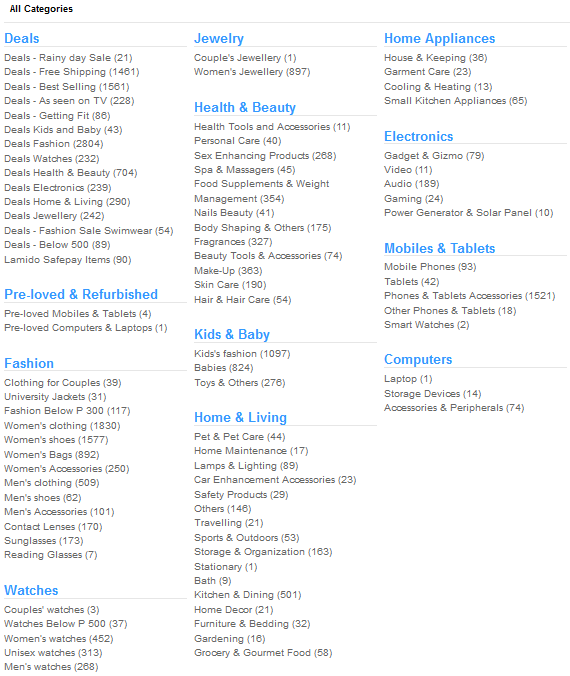
Lamido buy and sell is Philippines’s fastest growing marketplace where you can buy or sell items from many categories including fashion, electronics, mobiles & tablets, home appliances, and beauty, among others. In Lamido, a seller can list an item for sale and offer these at fix prices.

Lamido connects you to millions of buyers and sellers in the Philippines. You can find trusted merchants with amazing deals, compare prices and buy products from sellers from your neighborhood or from any part of the country.


Safe and Worry-free Transactions

Lamido website has a well organized layout. Hence, navigation through item categories is easy as ever. There are also multiple filters to aid you in finding and comparing the best deals. Moreover, users have the options to choose where and when they want the items to be delivered.  

Yes! With the safety and security of its buyers in mind, Lamido meticulously put a feature called “Lamido Safepay.” 

With it, buyers can deposit the payment for the items they bought via bank transfer (to Lamido’s bank account) or cash on delivery. Once the payment is confirmed, Lamido will only release the payment to the sellers when the buyer receives the ordered items, which should be in perfect working condition. If the buyer is not satisfied, returning of items is acceptable.

Lamido has two safe payment options.


  • Cash on delivery option in 6 easy steps

  • For Bank Transfer

Mobile Shopping


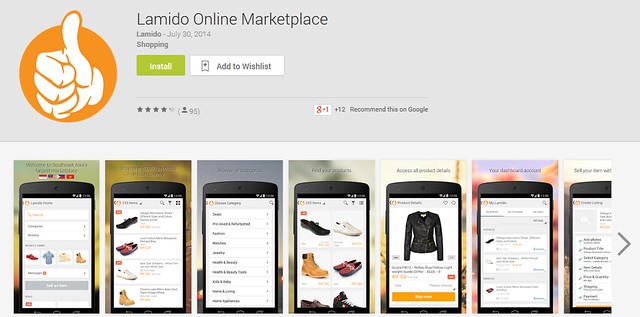
For smartphone and tablet users, please do note that Lamido App can be downloaded via Google Play.

Yes, Lamido.com.ph is available for browsing through your Android phone. The Lamido Android app was rolled out and officially launched last July 17, 2014. 

With this application, you can do online shopping on-the-go. You can also check out the detailed product information and images on the app.
Lamido Safepay and Buyer Protection Scheme


Worried about fly by night sellers on the internet? Don't worry Lamido Safepay and Buyer Protection Scheme have you covered!

Lamido buy and sell is Philippines’s fastest growing marketplace where you can buy or sell items from many categories including fashion, electronics, mobiles & tablets, home appliances, and beauty, among others. In Lamido, a seller can list an item for sale and offer these at fix prices.

Lamido connects you to millions of buyers and sellers in the Philippines. You can find trusted merchants with amazing deals, compare prices and buy products from sellers from your neighborhood or from any part of the country.


Safe and Worry-free Transactions

Lamido website has a well organized layout. Hence, navigation through item categories is easy as ever. There are also multiple filters to aid you in finding and comparing the best deals. Moreover, users have the options to choose where and when they want the items to be delivered.  

Yes! With the safety and security of its buyers in mind, Lamido meticulously put a feature called “Lamido Safepay.” 

With it, buyers can deposit the payment for the items they bought via bank transfer (to Lamido’s bank account) or cash on delivery. Once the payment is confirmed, Lamido will only release the payment to the sellers when the buyer receives the ordered items, which should be in perfect working condition. If the buyer is not satisfied, returning of items is acceptable.

Lamido has two safe payment options.


  • Cash on delivery option in 6 easy steps

  • For Bank Transfer

Mobile Shopping


For smartphone and tablet users, please do note that Lamido App can be downloaded via Google Play.

Yes, Lamido.com.ph is available for browsing through your Android phone. The Lamido Android app was rolled out and officially launched last July 17, 2014. 

With this application, you can do online shopping on-the-go. You can also check out the detailed product information and images on the app.

8 Advantages of Lamido Philippines Online Marketplace

8 Advantages of Lamido Philippines Online Marketplace


Only a few months old, Lamido Philippines online marketplace had change the landscape of the Philippines buy and sell market. 


Did you know that at Lamido, you and I can buy and sell items ranging from fashion, electronics, books, unique collectible and more. In each transaction, you can deal with either people from your city or from other parts of the country.

Now, everybody can buy and sell with minimal effort and time. This is a smart idea to inspire busy individuals to live better lives. To achieve a work-life balance, I believe in equipping oneself with knowledge, outsourcing when one is able to and making efficient use of tools and technology. During the Christmas season did you know that I’ve bought a lot of items via my android phone, tablet and internet, without stepping out of the house? Imagine the carbon footprints I've saved for our mother earth!


So, without further ado, here's my list of the 8 Advantages of Lamido Buy and Sell Online Marketplace. Everyone should do this in order to save the Earth and their wallet!

1. Buy and Sell at the most reasonable prices


Have you tried visiting Lamido Buy and Sell Online Marketplace already? If not, I suggest that you do that now. Click the link above and discover what Lamido online marketplace offer to its buyers. In Lamido site you'll find items (both used or new) with the best prices. By best, I mean most reasonable. Start comparing prices of items with those posted at olx and you'll be surprised how almost everything at Lamido is priced seemingly at a discount.

2. Free to Run Your Own Business and Make Money

Lamido allows users to promote and advertise products and sell them directly to customers by fixed, discounted or auctioned prices. Sellers can organize payment and shipping of the merchandise as they wish.

It is just like the Multiply Marketplace which closed down last May 31, 2013.  It is a good thing that Lamido is now here, that means would be entrepreneurs and merchants will be able to sell their items for free. Take note, there is no listing fee: you don’t pay anything until you close a deal. Registration steps to be a seller are easy to follow as well.

3. Safe and Worry-free Transactions


The Lamido website has a well organized layout, so navigation through item categories is easy. There are also multiple filters to aid you in finding and comparing the best deals. Moreover, users have the options to choose where and when they want the items to be delivered while safe and secure. Lamido has this feature called “Lamido Safepay.”

With it, buyers can deposit the payment for the items they bought via bank transfer (to Lamido’s bank account) or cash on delivery. Once the payment is confirmed, Lamido will only release the payment to the sellers when the buyer receives the ordered items, which should be in perfect working condition. If the buyer is not satisfied, returning of items is acceptable.

4. Dedicated Help Desk

It’s often frustrating when nobody hears out customer complaints and feedback. It’s great that Lamido has thought of working on customer service as it has a team that’s dedicated to attend to buyer complaints. This is what they call the“Buyer Protection Scheme,” which I think everyone will be (hopefully) happy about. Whenever a complaint with a seller is opened, the Order Fulfillment team sends a warning to the sellers to ship out orders or they will hide their listings from the Lamido.com. ph website.

5. Unique collectible, Unusual, Usable Products


The success of Amazon, Ebay, Etsy and Snapdeal, to name a few, can be attributed to the fact that there’s not a lot of sites where you can find unique collectible, unusual, usable products penetrating the online marketplace. These e-stores compete on individuality, aesthetics and the type and variety of products that are available.

This is where Lamido and the above mentioned sites are similar, I think. What’s noteworthy is that you can look for “hard-to-find” items in just one big site. Lamido’s brand and reputation for quality will drive the demand.

6.  Price comparisons

When you visit a store, you most likely have to settle for whatever price the vendor has placed on a particular item. Not so with online shopping - you have the ability to compare prices from hundreds of different vendors 

7.  Ease of payment options


Lamido e-shops accepts cash on delivery option, bank deposits, or payment via credit card.

Lamido is a site that makes everything simpler and easy for buyers and also allows sellers in the Philippines to maximize sales and revenue. Lamido is one of the many ventures owned by Rocket Internet designed to provide the best and safest marketplace for sellers, merchants and buyers. Successfully creating market leading online companies for more than 15 years worldwide, Rocket Internet is continuously finding ways to provide Internet users services they can use for their businesses and their daily use.

8.  
Mobile Shopping

For smartphone users, Lamido.com.ph is also available for browsing through your Android phone. The Lamido Android app was rolled out and officially launched last July 17, 2014. With this application, you can do online shopping on-the-go. You can also check out the detailed product information and images on the app.


Shop today and enjoy the great deals offered in Lamido – the fastest rising buy and sell online marketplace in the Philippines! Lamido, the best Buy & Sell Marketplace App in Southeast Asia! With Lamido app, you can easily browse, buy, sell and manage your Lamido experience whenever and wherever you are!

Download NOW for FREE and

✔ Buy and discover app exclusive deals and 100,000+ products on the go

✔ Selling is easy: Take a picture with your mobile, describe your product and sell in one click

✔ Get personalized notifications about your items and activities

✔ Instant messaging directly to sellers and customers

✔ Share your favorite products via social media, message and email

✔ Leave feedback and review products and sellers

Discover the endless possibilities and start buying and selling on Lamido!
8 Advantages of Lamido Philippines Online Marketplace


Only a few months old, Lamido Philippines online marketplace had change the landscape of the Philippines buy and sell market. 


Did you know that at Lamido, you and I can buy and sell items ranging from fashion, electronics, books, unique collectible and more. In each transaction, you can deal with either people from your city or from other parts of the country.

Now, everybody can buy and sell with minimal effort and time. This is a smart idea to inspire busy individuals to live better lives. To achieve a work-life balance, I believe in equipping oneself with knowledge, outsourcing when one is able to and making efficient use of tools and technology. During the Christmas season did you know that I’ve bought a lot of items via my android phone, tablet and internet, without stepping out of the house? Imagine the carbon footprints I've saved for our mother earth!


So, without further ado, here's my list of the 8 Advantages of Lamido Buy and Sell Online Marketplace. Everyone should do this in order to save the Earth and their wallet!

1. Buy and Sell at the most reasonable prices


Have you tried visiting Lamido Buy and Sell Online Marketplace already? If not, I suggest that you do that now. Click the link above and discover what Lamido online marketplace offer to its buyers. In Lamido site you'll find items (both used or new) with the best prices. By best, I mean most reasonable. Start comparing prices of items with those posted at olx and you'll be surprised how almost everything at Lamido is priced seemingly at a discount.

2. Free to Run Your Own Business and Make Money

Lamido allows users to promote and advertise products and sell them directly to customers by fixed, discounted or auctioned prices. Sellers can organize payment and shipping of the merchandise as they wish.

It is just like the Multiply Marketplace which closed down last May 31, 2013.  It is a good thing that Lamido is now here, that means would be entrepreneurs and merchants will be able to sell their items for free. Take note, there is no listing fee: you don’t pay anything until you close a deal. Registration steps to be a seller are easy to follow as well.

3. Safe and Worry-free Transactions


The Lamido website has a well organized layout, so navigation through item categories is easy. There are also multiple filters to aid you in finding and comparing the best deals. Moreover, users have the options to choose where and when they want the items to be delivered while safe and secure. Lamido has this feature called “Lamido Safepay.”

With it, buyers can deposit the payment for the items they bought via bank transfer (to Lamido’s bank account) or cash on delivery. Once the payment is confirmed, Lamido will only release the payment to the sellers when the buyer receives the ordered items, which should be in perfect working condition. If the buyer is not satisfied, returning of items is acceptable.

4. Dedicated Help Desk

It’s often frustrating when nobody hears out customer complaints and feedback. It’s great that Lamido has thought of working on customer service as it has a team that’s dedicated to attend to buyer complaints. This is what they call the“Buyer Protection Scheme,” which I think everyone will be (hopefully) happy about. Whenever a complaint with a seller is opened, the Order Fulfillment team sends a warning to the sellers to ship out orders or they will hide their listings from the Lamido.com. ph website.

5. Unique collectible, Unusual, Usable Products


The success of Amazon, Ebay, Etsy and Snapdeal, to name a few, can be attributed to the fact that there’s not a lot of sites where you can find unique collectible, unusual, usable products penetrating the online marketplace. These e-stores compete on individuality, aesthetics and the type and variety of products that are available.

This is where Lamido and the above mentioned sites are similar, I think. What’s noteworthy is that you can look for “hard-to-find” items in just one big site. Lamido’s brand and reputation for quality will drive the demand.

6.  Price comparisons

When you visit a store, you most likely have to settle for whatever price the vendor has placed on a particular item. Not so with online shopping - you have the ability to compare prices from hundreds of different vendors 

7.  Ease of payment options


Lamido e-shops accepts cash on delivery option, bank deposits, or payment via credit card.

Lamido is a site that makes everything simpler and easy for buyers and also allows sellers in the Philippines to maximize sales and revenue. Lamido is one of the many ventures owned by Rocket Internet designed to provide the best and safest marketplace for sellers, merchants and buyers. Successfully creating market leading online companies for more than 15 years worldwide, Rocket Internet is continuously finding ways to provide Internet users services they can use for their businesses and their daily use.

8.  
Mobile Shopping

For smartphone users, Lamido.com.ph is also available for browsing through your Android phone. The Lamido Android app was rolled out and officially launched last July 17, 2014. With this application, you can do online shopping on-the-go. You can also check out the detailed product information and images on the app.


Shop today and enjoy the great deals offered in Lamido – the fastest rising buy and sell online marketplace in the Philippines! Lamido, the best Buy & Sell Marketplace App in Southeast Asia! With Lamido app, you can easily browse, buy, sell and manage your Lamido experience whenever and wherever you are!

Download NOW for FREE and

✔ Buy and discover app exclusive deals and 100,000+ products on the go

✔ Selling is easy: Take a picture with your mobile, describe your product and sell in one click

✔ Get personalized notifications about your items and activities

✔ Instant messaging directly to sellers and customers

✔ Share your favorite products via social media, message and email

✔ Leave feedback and review products and sellers

Discover the endless possibilities and start buying and selling on Lamido!

Sunday, January 18, 2015

HTC Desire 820

HTC Desire 820
Hands on with the HTC Desire 820, one very impressive mid-range phone!

HTC Desire 820
SRP Php15630 only!
HTC Desire 820
Hands on with the HTC Desire 820, one very impressive mid-range phone!

HTC Desire 820
SRP Php15630 only!

Saturday, January 17, 2015

Samsung GALAXY Tab 3 Lite t110

Samsung GALAXY Tab 3 Lite t110

With Samsung quality built in, the GALAXY Tab 3 Lite is made for the essentials.
Everyday internet use and functionality to manage the everyday!
GALAXY Tab 3 Lite t110
SRPPhp5380
Samsung GALAXY Tab 3 Lite t110

With Samsung quality built in, the GALAXY Tab 3 Lite is made for the essentials.
Everyday internet use and functionality to manage the everyday!
GALAXY Tab 3 Lite t110
SRPPhp5380

Friday, January 16, 2015

Sony Xperia M2 Aqua

Sony Xperia M2 Aqua 

The waterproof Xperia M2 Aqua covered in splashes of water!
Xperia M2 Aqua
SRP Php11790
Sony Xperia M2 Aqua 

The waterproof Xperia M2 Aqua covered in splashes of water!
Xperia M2 Aqua
SRP Php11790

Thursday, January 15, 2015

SAMSUNG GALAXY A-SERIES

SAMSUNG GALAXY A-SERIES

SAMSUNG GALAXY A-SERIES

 
Chinay Copyright © 2012 Design by Ipietoon Blogger Template